tchutch
Administrateur
-
Adhésion
-
Dernière visite
Fichiers publié par tchutch
-
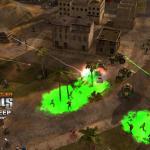
Cette mission devait être la 3ème mission de la campagne de la GLA où des tracteurs chimiques doivent attaquer une ville.
EA LOS ANGELES RELEASES THE LOST MISSION OF COMMAND & CONQUER GENERALS
Attention generals! You have been requested to report for duty one more time.
In celebration of the sixth anniversary of the award-winning real-time strategy classic Command & Conquer Generals, EA Los Angeles today released an exclusive gift to the Command & Conquer fans-- the lost mission of Command & Conquer Generals. The never-before-seen and controversial Global Liberation Army mission was not included in the game´s original 2003 release and has been hidden and securely stored away in a secret location at the EA Los Angeles development studio until today. Command & Conquer fans can now download the mission Black Sheep for free on www.commandandconquer.com and unleash their inner General.
Black Sheep was originally slated to be the third mission in the Global Liberation Army campaign where players were given command of the Toxin Tractor, a slow-going farm vehicle modified to spray a deadly corrosive agent, and ordered to eliminate a town that had been “corrupted beyond salvation†by the USA´s propaganda. While the mission was ultimately removed from Generals, the Toxin Tractor was available in other campaign missions, as well as in multiplayer and skirmish modes.
Command & Conquer Generals is considered a genre-defining RTS of its time. The first fully 3D real-time strategy game, Generals put the player´s trigger finger on the pulse of modern warfare and let gamers command massive armies of bleeding-edge military weaponry across a globe teetering on the brink of destruction. With three unique factions, each with customizable high-tech arsenals ready to deliver unprecedented firepower on land or in the skies, gamers could wage real-time war in more ways than ever before, with thrilling air-to-air duels, urban combat, and an enhanced veterancy model.
Black Sheep will require Command & Conquer Generals to play.
-
- 125 Téléchargements
Mis à jour -
- 306 Téléchargements
Mis à jour -
- 3 092 Téléchargements
Mis à jour -
- 531 Téléchargements
tchutch dans Alerte Rouge 3Mis à jour -
- 119 Téléchargements
Mis à jour -
- 57 Téléchargements
tchutch dans The first DecadeMis à jour -
-
-
- 308 Téléchargements
tchutch dans Alerte Rouge 2Mis à jour -
- 538 Téléchargements
tchutch dans Alerte Rouge 2Mis à jour -
- 357 Téléchargements
tchutch dans Alerte RougeMis à jour -
- 144 Téléchargements
Mis à jour